

How to Top Up Your OKX Wallet: A Complete Guide for Crypto Users

Learning how to top up your OKX wallet is the first essential step to trading, staking, and exploring the vast world of cryptocurrencies on one of the world's leading exchanges. Whether you're funding your account with crypto from another wallet or using traditional money, this comprehensive guide will walk you through every method available, ensuring a smooth and secure deposit experience. We'll cover everything from simple crypto transfers to buying crypto with a credit card, helping you get your funds where they need to be.
Understanding Your OKX Wallet: Deposit Addresses Explained
Before you initiate any top-up, it's crucial to understand that your OKX wallet isn't a single account but a collection of addresses for different cryptocurrencies. Each coin or token, like Bitcoin (BTC), Ethereum (ETH), or USDT, has its own unique deposit address. Sending Bitcoin to an Ethereum address will result in permanent loss of funds, so always double-check the network and address. Your OKX deposit address is a string of letters and numbers or a QR code, specifically generated for you to receive a particular type of asset.
Method 1: How to Deposit Cryptocurrency from an External Wallet
This is the most common method for topping up your OKX wallet if you already hold crypto elsewhere. The process involves transferring digital assets from another exchange, like Binance or Coinbase, or a personal hardware wallet like a Ledger or Trezor, to your OKX deposit address. The key here is selecting the correct network to avoid costly mistakes. For example, when depositing USDT, you must choose between ERC20 (Ethereum network), TRC20 (TRON network), or other supported networks, as sending via the wrong one can lead to lost funds.
Step-by-Step Guide to Crypto Deposits on OKX
To successfully deposit cryptocurrency, follow these steps carefully. First, log in to your OKX account and navigate to the 'Assets' section. Click on 'Deposit' and you will see a search bar. Type in the name of the cryptocurrency you wish to deposit, for instance, 'Bitcoin' or 'BTC'. After selecting the asset, OKX will display your unique deposit address and its QR code. Copy this address exactly or scan the QR code. Then, go to the platform or wallet you are sending from, paste the OKX deposit address, select the corresponding network, and confirm the transaction. Always start with a small test transaction if you are depositing a large amount for the first time.
Method 2: How to Buy Crypto with Fiat Currency in OKX
For beginners who don't already own cryptocurrency, OKX offers integrated fiat on-ramps. This allows you to directly purchase crypto like BTC, ETH, or USDT using your local currency via bank transfer, credit card, or other popular payment methods. This process is often the quickest way to go from cash to crypto within the OKX ecosystem. The platform partners with various third-party providers to facilitate these transactions, making it a seamless experience for users looking to top up their wallet instantly.
Using a Credit or Debit Card for Instant Top-Ups
One of the fastest ways to fund your OKX wallet is by using a credit or debit card. Within the OKX app or website, find the "Buy Crypto" option, often labeled as "Quick Buy" or something similar. You will then select the currency you want to buy and the fiat currency you are paying with. Enter the amount, and the system will show you the estimated fees and the final amount of crypto you will receive. After confirming, you'll be redirected to a secure gateway to enter your card details. The purchased crypto is typically credited to your OKX funding wallet within minutes.
Method 3: Third-Party Payment Providers and P2P Trading
OKX also supports topping up through third-party payment channels and a robust Peer-to-Peer (P2P) marketplace. The P2P platform is especially popular in regions with limited banking access. Here, you can post an ad to buy crypto from another individual using a preferred payment method like bank transfer, PayPal, or cash. OKX acts as the escrow service, holding the seller's crypto until you confirm receipt of the payment, ensuring a secure and trustworthy transaction for both parties involved in the top-up process.
Cross-Chain Deposits and Using the OKX Web3 Wallet
For advanced users, OKX supports cross-chain deposits, allowing you to deposit assets from one blockchain to another compatible one within the OKX ecosystem. Furthermore, the OKX Web3 Wallet is a powerful feature that lets you manage assets across multiple chains in one place. You can easily transfer funds between your OKX exchange account and your Web3 Wallet, providing a bridge between the centralized finance (CeFi) services of the exchange and the decentralized finance (DeFi) applications of the broader crypto world.
Common Top-Up Mistakes and How to Avoid Them
Many users, especially newcomers, make avoidable errors when topping up. The most critical mistake is sending funds via the wrong network. Always ensure the network selected on the sending platform matches the network on your OKX deposit page. Another common issue is forgetting the memo or tag when depositing certain coins like XRP or EOS; this is an additional identifier required by those networks, and without it, your funds may be lost. Lastly, always verify the transaction with a small amount first to confirm everything is working correctly before moving larger sums.
Tracking Your Deposit and What to Do If It's Delayed
After initiating a deposit, you can track its status in the 'Transaction History' or 'Deposit History' section of your OKX assets page. Crypto transactions require network confirmations, so delays of a few minutes to an hour are normal, depending on network congestion. If your deposit is taking longer than expected, first check the transaction ID (TXID) on the relevant blockchain explorer. If the explorer shows many confirmations but your funds haven't arrived, it's time to contact OKX support with your TXID and relevant details for assistance.
Securing Your OKX Account After Topping Up
Once your wallet is funded, security becomes paramount. Enable Two-Factor Authentication (2FA) using an authenticator app like Google Authenticator or Authy for an extra layer of protection beyond your password. OKX also offers anti-phishing codes, withdrawal address whitelisting, and device management features. Regularly review your account activity and never share your private keys, seed phrase, or 2FA codes with anyone. A well-funded wallet is a prime target, so taking these proactive security measures is non-negotiable.
Topping up your OKX wallet is a straightforward process once you understand the different methods and key precautions. By following this guide, you can confidently deposit cryptocurrencies via transfer, purchase them with fiat, or use P2P trading, all while avoiding common pitfalls. With your wallet funded, you're now ready to dive into the world of crypto trading, earning, and exploring decentralized applications on the OKX platform.
“How to Top Up Your OKX Wallet: A Complete Guide for Crypto Users” 的相关文章
区块链保本机制:理解加密货币投资的风险管理策略
区块链保本机制:理解加密货币投资的风险管理策略最后更新:2025年7月20日目录区块链保本机制概述主要区块链保本机制类型智能合约保本方案稳定币对冲策略加密货币期权保护质押挖矿中的保本策略未来发展趋势总结与建议区块链保本机制概述区块链保本机制:理解加密货币投资的风险管理策略在高度波动的加密货币市场中,...
NFT_市场春潮涌动;60_亿美元市值重现,鲸鱼豪掷千金扫货_CryptoPunks
NFT 市场春潮涌动:60 亿美元市值重现,鲸鱼豪掷千金扫货 CryptoPunksNFT 市场 非同质化代币 市场复苏 CryptoPunks 以太坊 蓝筹NFT 投资分析目录· 沉寂后的爆发:NFT 市值重回 60 亿美元· 巨鲸的号角:CryptoPunks 成焦点·&nb...
解密数字黄金;加密货币入门指南与未来展望
解密数字黄金:加密货币入门指南与未来展望加密货币 比特币 以太坊 区块链 数字金融 投资指南 Web3目录· 虚拟世界的新货币:什么是加密货币?· 数字货币的四大天王:比特币、以太坊及其他· 区块链的魔力:加密货币为何安全?· 加密货币的魅力:自由、隐私与效率...

超越“数字黄金”;以太坊的无限可能与蜕变之路
超越“数字黄金”:以太坊的无限可能与蜕变之路以太坊 区块链 ETH 智能合约 DeFi NFT Web3 权益证明目录· 以太坊:不仅仅是数字货币,更是全球计算机· 以太坊、以太币与 ETH:概念辨析· 智能合约的魔力:自动化信任的基石· 以太坊的“进化论”:...
Roblox中的BTC是什么意思 | 游戏币与比特币区别 | 虚拟经济解析
body { font-family: 'Arial', sans-serif; line-height: 1.6; color: #333; max-width: 1200px;...
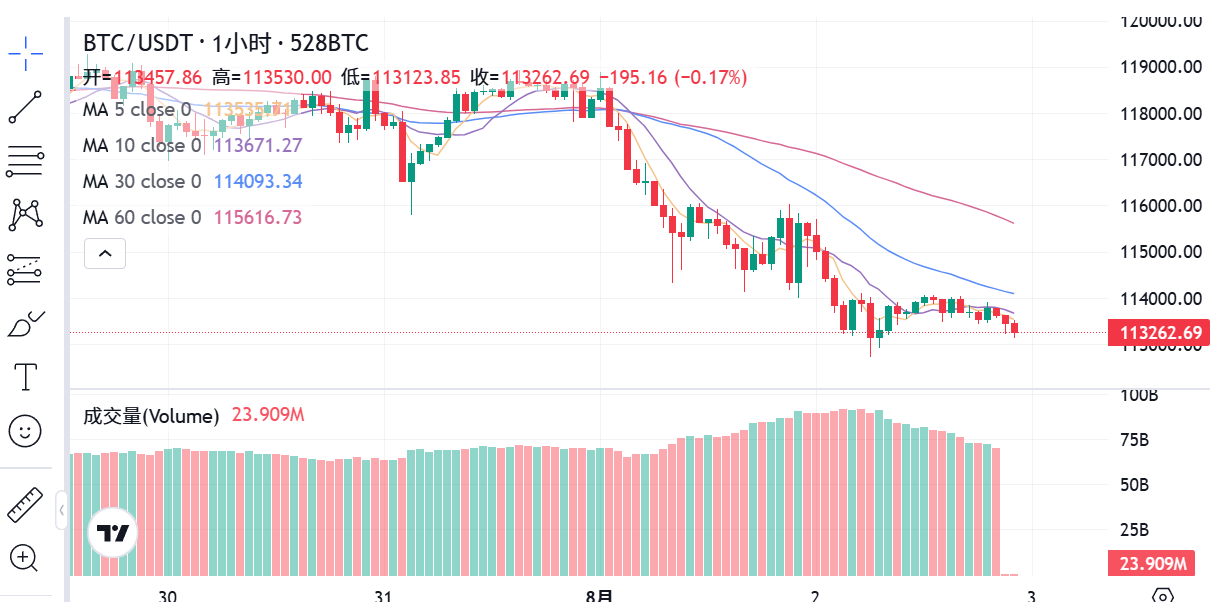
BTC最新成交量分析:市场流动性深度解读
BTC最新成交量分析:市场流动性深度解读最后更新:2025年8月2日目录成交量概览成交量趋势分析交易所成交量对比大额交易追踪市场流动性评估成交量与价格关系成交量技术指标投资洞察常见问题BTC成交量概览截至2025年8月2日,比特币24小时全球交易量达到580亿美元,较上周平均水平增长35%。其中现货...